

 Facebook
 Twitter
 Instagram
 YouTube
How to Create and Implement Movie Carousel Schema in a Website



If you publish movie lists and want them to appear in Google’s horizontal scrollable carousel, you need to implement Movie Carousel structured data correctly.
When done properly, this schema helps Google understand that your page contains a list of movies and makes it eligible for enhanced search display.
In this guide, you’ll learn:
- What Movie Carousel schema is
- The required properties you must include
- Two valid implementation examples
- Common mistakes to avoid
- How to test your schema properly
What Is Movie Carousel Schema?
Movie Carousel Schema is structured data that tells Google:
“This page contains a list of movies.”
When Google clearly understands your content structure, it may display your movies in a horizontal carousel format in search results.
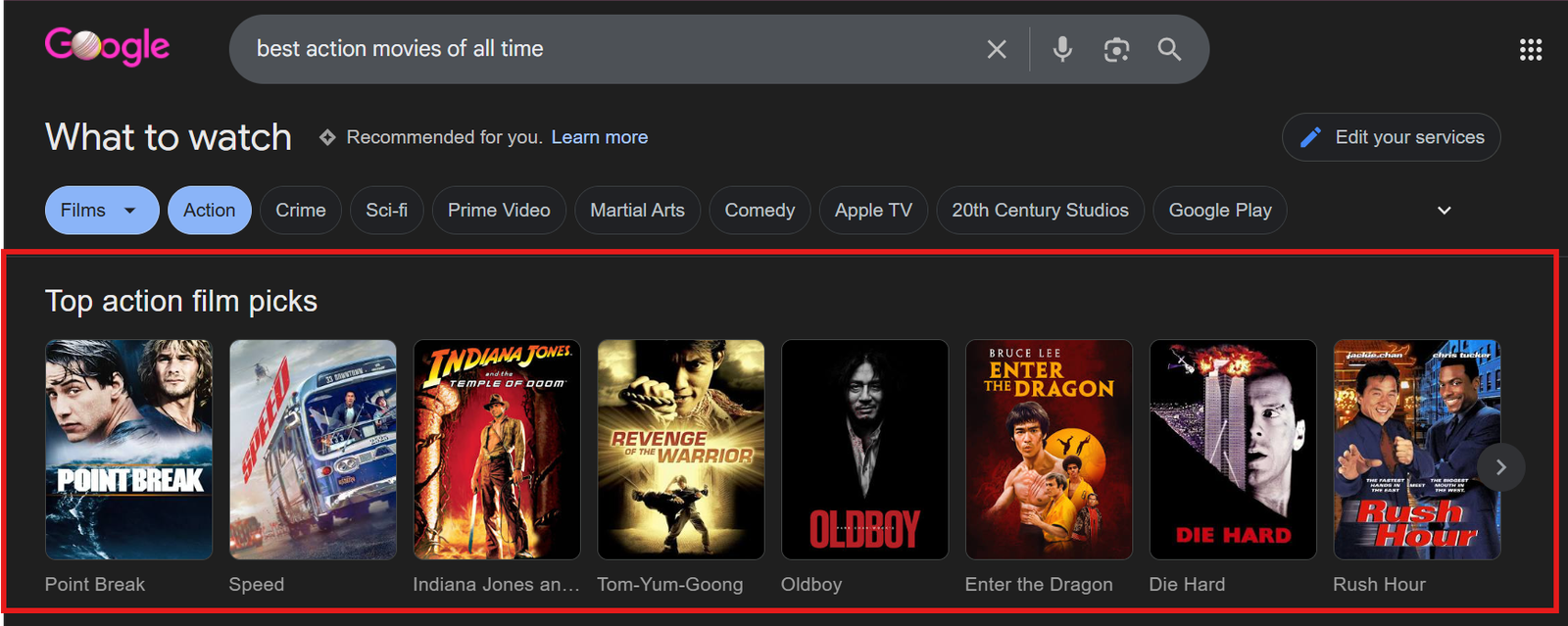
This is commonly used for:
- Top movie lists
- Genre-based collections
- Year-based roundups
- Streaming platform categories
Important : Structured data improves eligibility. It does not guarantee that Google will show a carousel.
Required Properties
For a Movie Carousel to work, each movie must include certain required information.
1. name
This is the movie title.
It must match exactly what users see on the page.
If your page shows “The People who Lived” your schema must use the same title.
Why it matters: Google uses this to identify the movie correctly.
2. image
This is the movie poster or representative image.
Google has strict requirements:
- The image must be crawlable (not blocked by robots.txt)
- It must represent the movie
- It must be .jpg, .png, or .gif
- It must be high resolution
- It must follow a 6:9 aspect ratio
Why 6:9 matters : Google’s carousel layout is designed for this ratio. If your image deviates too much, your content may not be eligible.
Image mistakes are one of the most common reasons for failure.
Recommended Properties
While not mandatory, these significantly improve your chances:
- aggregateRating : shows average rating
- dateCreated : release date (YYYY-MM-DD format)
- director : must use “@type”: “Person”
- review : only if a visible review exists on the page
Never add ratings or reviews that users cannot see.
Structured data must reflect visible content.
Examples of Movie Carousel Schema
Google allows two valid structures depending on your page layout.
You must choose the one that matches your website.
Example 1: Summary Page + Separate Detail Pages
Use this when:
- Your page lists movies briefly
- Each movie links to its own detailed page
In this case, the summary page only contains an ItemList with URLs.
<script type="application/ld+json">
{
 "@context": "https://schema.org",
 "@type": "ItemList",
 "name": "Top English Movies of 2025",
 "itemListElement": [
   {
     "@type": "ListItem",
     "position": 1,
     "url": "https://example.com/movies/malai-gozrilla-2025"
   },
   {
     "@type": "ListItem",
     "position": 2,
     "url": "https://example.com/movies/john-tuned-2025"
   },
   {
     "@type": "ListItem",
     "position": 3,
     "url": "https://example.com/movies/free-mention-2025"
   }
 ]
}
</script>
Important : Each linked movie page must contain its own full Movie structured data.
Example 2: Single All-In-One Page
Use this when:
- All movie information appears on one page
- No separate detail pages exist
In this case, each ListItem includes a full Movie object.
<script type="application/ld+json">
{
 "@context": "https://schema.org",
 "@type": "ItemList",
 "name": "Best Malayalam Movies of 2026",
 "itemListElement": [
   {
     "@type": "ListItem",
     "position": 1,
     "item": {
       "@type": "Movie",
       "name": "Manjummel Boys",
       "url": "https://example.com/manjummel-2026#boys-gone",
       "image": "https://example.com/images/manjummel-boys-6x9.jpg",
       "dateCreated": "2025-04-18",
       "director": {
         "@type": "Person",
         "name": "Chidambaram"
       },
       "aggregateRating": {
         "@type": "AggregateRating",
         "ratingValue": "4.6",
         "reviewCount": "798"
       }
     }
   }
 ]
}
</script>
Important:
- The movie content must be visible on the page.
- Do not mark up hidden content.
Common Mistakes to Avoid
Avoid these errors:
- Missing the required image property
- Using low-quality or incorrect aspect ratio images
- Adding ratings that are not visible on the page
- Incorrect JSON formatting
- Mixing summary and all-in-one structures
- Marking up content users cannot see
Google may ignore or penalize incorrect structured data.
How to Test Your Movie Carousel Schema
After implementation:
- Use Google’s Rich Results Test
- Paste your URL or code
- Check for errors
- Fix warnings if necessary
- Submit your page in Google Search Console
Even a small formatting error can break eligibility.
Always test before publishing.
Conclusion
Movie Carousel schema is not complicated.
To implement it correctly:
- Use ItemList
- Add proper ListItem positioning
- Include required properties (name and image)
- Follow image guidelines strictly
- Match schema to your page structure
Keep your implementation clean, accurate, and aligned with visible content.
If done correctly, your movie listings become eligible for enhanced visibility in Google Search through carousel results.
By Rohith Sasanken