


 Facebook
 Twitter
 Instagram
 YouTube
How to Create and Implement Local Business Schema on a Website



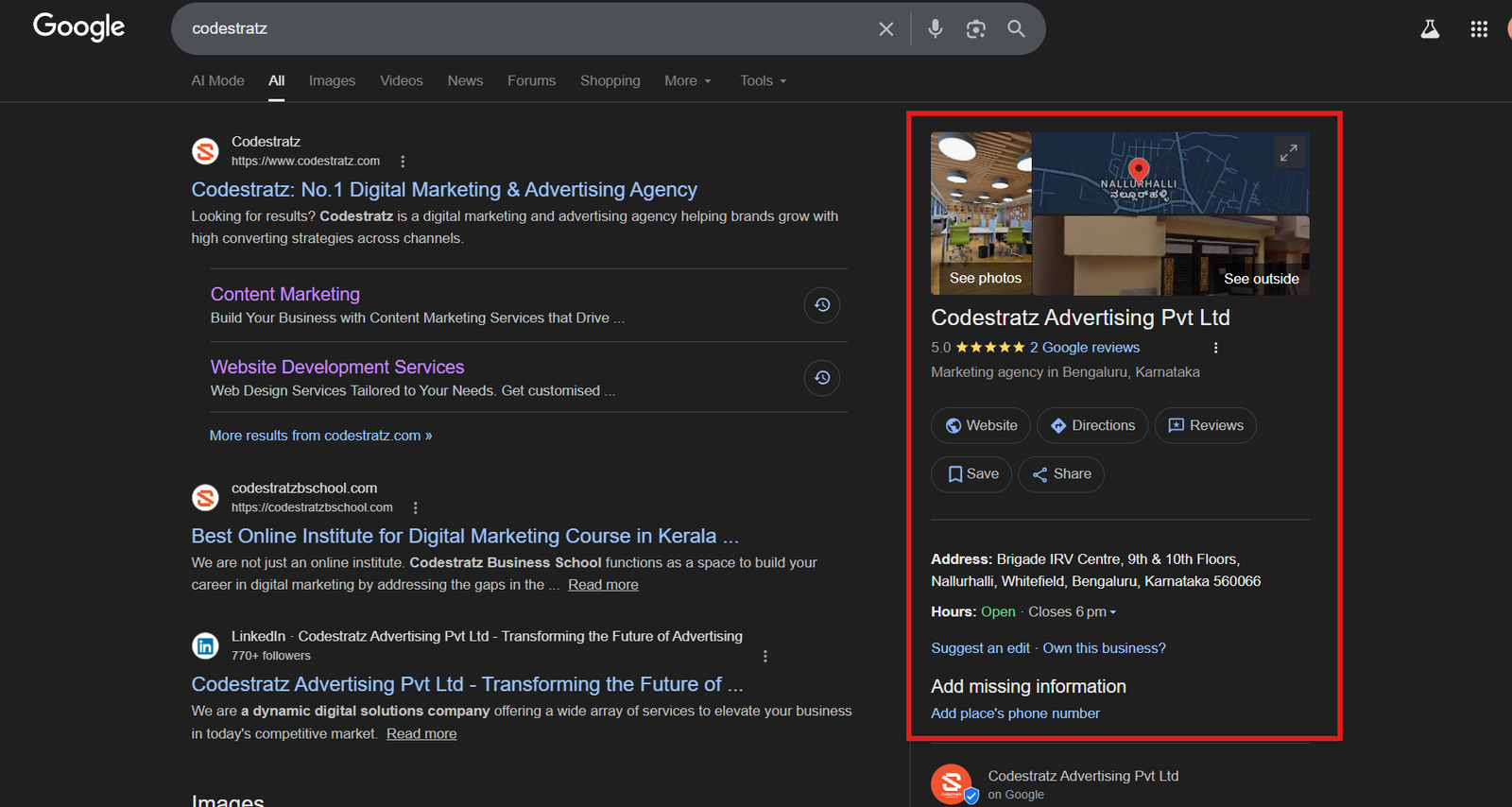
When users search for a business near them, Google often displays useful details directly in search results. This may include the business address, phone number, opening hours, and sometimes images or reviews.
Search engines show this information because they clearly understand the business behind the website. Structured data helps provide that clarity.
In this guide, you will learn what this structured data is, why it matters, when it should be used, and how to implement it correctly.
What is Local Business Schema?
Local business schema is a type of structured data used to describe a company that operates from a physical location and serves customers within a specific geographic area.
It provides search engines with important information such as:
- Business name
- Website URL
- Contact phone number
- Physical address
- Business hours
- Geographic coordinates
Unlike general organization markup, this schema focuses specifically on businesses that interact with customers at a physical location. Because of this, it plays an important role in local search visibility.
Why Local Businesses Schema is Important
Search engines rely on accurate and consistent information to understand businesses and their locations.
When implemented correctly, structured data helps:
- Improve visibility in local search results
- Strengthen geographic relevance signals
- Support knowledge panel information
- Align website information with Google Business Profile
- Increase trust in the information shown in search results
For businesses that rely on local customers, structured data becomes an essential part of a strong local SEO strategy.
Where This Schema Appears in Google Search
Structured data for local businesses supports several features in Google’s ecosystem, including:
- Local search results
- Google Maps listings
- Knowledge panels
- Business information sections in search results
Although it may not always create a visible rich result, it helps search engines better understand the business and its location.
When Should You Use It?
This markup should be used when:
- Your business operates from a physical location
- Customers can visit your office, store, or facility
- Your services are tied to a specific geographic area
- Your business has a verified Google Business Profile
It is commonly implemented on:
- The homepage
- Contact pages
Location pages for businesses with multiple branches
When Should You Avoid Using It?
You should avoid using this markup when:
- The business operates entirely online
- The address is not publicly accessible
- The location information is inaccurate or incomplete
If a website represents a company without a physical customer location, organization schema may be more appropriate.
How Local Business Schema Works
Structured data describes your business in a format that search engines can understand easily.
When search engines crawl your website:
- They read the structured business information.
- They identify the business name, address, and contact details.
- They associate the website with the physical location of the business.
- They connect this information with other sources such as Google Business Profile.
This helps search engines interpret business information more accurately.
Core Elements of Local Business Schema
A properly structured markup contains several key properties that define the business.
@type
This property defines the type of entity being described. The general type is LocalBusiness, but it is often better to use a more specific subtype such as Restaurant, Store, ProfessionalService, or EducationalOrganization.
Using a more specific type gives search engines additional context.
name
The name property represents the official name of the business. It should match the name used on your website and business listings.
url
This property specifies the main website address of the business, usually the homepage.
telephone
The telephone property contains the primary contact number of the business. This number should match the phone number displayed on the website and online listings.
address
The address property describes the full physical location of the business. It typically includes street address, city, region, postal code, and country.
openingHours
This property defines the operating hours of the business and tells search engines when the business is open to customers.
geo
The geo property provides geographic coordinates such as latitude and longitude. These coordinates help search engines identify the exact location of the business.
sameAs
The sameAs property connects the website with official social media profiles or trusted listings. These links help search engines confirm that different profiles represent the same business.
Implementing the Schema Using JSON-LD
JSON-LD is the recommended format because it keeps structured data separate from the visible page content and is easier to maintain.
Below is a complete example.
<script type="application/ld+json">
{
"@context": "https://schema.org",
"@type": "LocalBusiness",
"@id": "https://example.com/#localbusiness",
"name": "ABC Digital Marketing Institute",
"url": "https://example.com",
"logo": "https://example.com/logo.png",
"image": "https://example.com/business-photo.jpg",
"telephone": "+91-9000000000",
"priceRange": "$$",
"address": {
  "@type": "PostalAddress",
  "streetAddress": "123 Business Street",
  "addressLocality": "Bengaluru",
  "addressRegion": "Karnataka",
  "postalCode": "560001",
  "addressCountry": "IN"
},
"geo": {
  "@type": "GeoCoordinates",
  "latitude": 12.9716,
  "longitude": 77.5946
},
"openingHoursSpecification": {
  "@type": "OpeningHoursSpecification",
  "dayOfWeek": [
    "Monday",
    "Tuesday",
    "Wednesday",
    "Thursday",
    "Friday",
    "Saturday"
  ],
  "opens": "09:00",
  "closes": "18:00"
},
"sameAs": [
  "https://www.facebook.com/example",
  "https://www.linkedin.com/company/example",
  "https://www.instagram.com/example"
]
}
</script>
Implementing the Schema Using Microdata
Structured data can also be added using Microdata within the HTML markup.
<div>
ABC Digital Marketing Institute
<img decoding="async" src="https://example.com/logo.png" alt="Business Logo" />
<img decoding="async" src="https://example.com/business-photo.jpg" alt="Business Image" />
Phone: +91-9000000000
$$
<div>123 Business Street,
Bengaluru,
Karnataka,
560001,
IN</div>
<div></div>
</div>
Organization Schema vs Local Business Schema
Organization Schema describes a company as a general business entity and is commonly used for brands that operate online or across multiple locations. It focuses on identifying the organization behind the website by including details such as the company name, logo, website URL, and social media profiles.
Local business markup, on the other hand, is designed for companies that operate from a physical location and serve customers in a specific area. It includes additional details such as address, phone number, business hours, and geographic coordinates to help search engines understand the location of the business.
If your business has a physical office or store where customers can visit, this schema is usually the more appropriate choice.
Validating the Structured Data
After implementation, validation is important.
You can test your markup using:
- Google Rich Results Test
- Schema Markup Validator
These tools help identify errors, warnings, or missing properties.
Common Implementation Mistakes
Some common issues include:
- Incorrect business address
- Inconsistent business name formatting
- Missing postal codes
- Incorrect geographic coordinates
- Outdated phone numbers or business hours
- Structured data that does not match visible page content
Maintaining accurate and consistent information across all platforms is essential.
Conclusion
Structured data helps search engines clearly understand important business details such as location, contact information, and operating hours.
While it may not always create visible rich results, it strengthens local search signals and improves how search engines interpret business information.
When implemented correctly and validated properly, it becomes an important component of a strong local SEO strategy.
By Rohith Sasanken