


 Facebook
 Twitter
 Instagram
 YouTube
How to Create and Implement Article Schema in a Website



Article schema helps search engines clearly understand written content such as blog posts, news articles, and editorial pages. When implemented correctly, it improves how titles, images, authors, and publish dates appear in search results across Google Search, Google News, and other Google properties.
This guide explains what Article schema is, when it should be used, and how to create and implement it step by step using both HTML microdata and JSON-LD, with practical examples that can be used directly on a website.
What Is Article Schema?
Article schema is structured data used to describe written content on a web page. It tells search engines that the page is an article and provides clear signals about:
- The article title
- The author
- The publish and update dates
- The main image
- The publisher or organisation behind the content
Google supports three Article-related schema types:
- Article – for general written content
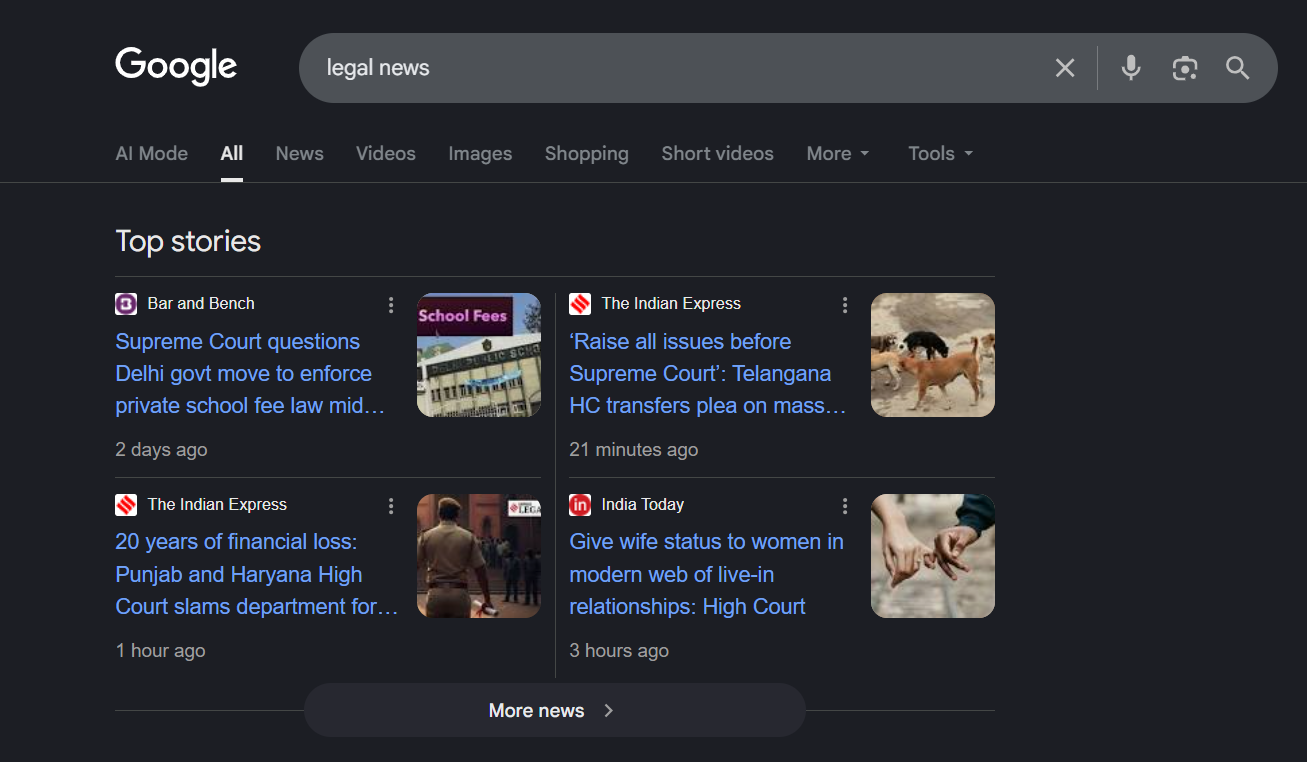
- NewsArticle – for journalistic or time-sensitive content
- BlogPosting – for blog posts and editorial articles
Selecting the correct type helps Google interpret the intent and context of the content accurately.
Example Of NewsArticle
When Should You Use Article Schema?
Article schema should be used only when the main purpose of the page is written content.
Appropriate use cases include:
- Blog posts
- News articles
- Editorial or opinion pieces
- Sports or event-related articles
- Educational or informational articles
Article schema should not be used on:
- Product pages
- Service pages
- Category or listing pages
- Lead generation or landing pages
Using Article schema on non-article pages can lead to structured data issues or manual actions.
Article Schema Types Explained
Article
Use this type for general written content that does not specifically qualify as news or a blog post.
NewsArticle
Use this type for journalistic content published by news platforms or publishers, especially time-sensitive reporting.
BlogPosting
Use this type for blog posts published on personal blogs, company blogs, or editorial sections of websites.
Core Properties Used in Article Schema
Google does not enforce mandatory properties, but the following are strongly recommended to ensure proper interpretation and eligibility for enhanced search features.
Key Properties and Their Purpose
- headline
Defines the article title. Keep it concise to avoid truncation in search results. - image
Represents the main visual of the article. Google recommends providing multiple image sizes. - datePublished
Indicates when the article was first published. - dateModified
Helps Google understand when the content was last updated. - author
Identifies the individual or organisation responsible for the content.
Author Markup Best Practices
Correct author markup improves trust and content clarity.
How to Define an Author
- Use Person for individual writers
- Use Organization for companies or publishers
- Always include: Name & url
Handling Multiple Authors
Each author must be defined separately.
Correct format:
“author”: [
{ “@type”: “Person”, “name”: “Rohith Sasanken” },
{ “@type”: “Person”, “name”: “Vishnu F” }
]
Incorrect format:
“author”: {
“name”: “Rohith Sasanken , Vishnu F”}
Avoid adding job titles, honorifics, or publisher names inside the author.name field.
How to Create Article Schema in a Website Using HTML
Article schema can be created directly in HTML using microdata attributes. This method embeds structured data into the page elements themselves.
When using HTML microdata:
- Schema properties are added inside HTML tags
- Each element such as headline, author, and date is marked individually
- Content updates require updating both text and markup
This approach is suitable for static websites or custom-built themes where content changes are minimal.
Example of Article Schema Using HTML Microdata
<article itemscope itemtype="https://schema.org/Article">
<h1 itemprop="headline">How to Create and Implement Article Schema in a Website</h1>
<span itemprop="author" itemscope itemtype="https://schema.org/Person">
<span itemprop="name">Rohith Sasanken</span>
</span>
<time itemprop="datePublished" datetime="2024-01-05">
January 5, 2024
</time>
<img decoding="async" src="https://example.com/article-image.jpg" itemprop="image" alt="Article image">
</article>
This example shows how Article schema is applied directly within the page structure using HTML.
How to Create Article Schema in a Website Using JSON-LD
JSON-LD is the recommended format by Google for implementing Article schema. It separates structured data from visible content, making it easier to maintain and scale.
When using JSON-LD:
- Schema is added as a script
- Page layout remains untouched
- Updates can be made independently
This format works best for blogs, news platforms, and CMS-based websites.
Example of Article Schema Using JSON-LD
<script type="application/ld+json">
{
  "@context": "https://schema.org",
  "@type": "BlogPosting",
  "headline": "How to Create and Implement Article Schema in a Website",
  "image": [
    "https://example.com/images/article-1x1.jpg",
    "https://example.com/images/article-4x3.jpg",
    "https://example.com/images/article-16x9.jpg"
  ],
  "datePublished": "2024-01-05T08:00:00+05:30",
  "dateModified": "2024-02-05T09:20:00+05:30",
  "author": {
    "@type": "Person",
    "name": "Rohith Sasanken",
    "url": "https://example.com/author/rohith-sasanken"
  },
  "publisher": {
    "@type": "Organization",
    "name": "Example Media",
    "url": "https://example.com"
  }
}
</script>
This is the most reliable method for implementing Article schema on a website.
Article Schema Example Explained
Each property in the example serves a clear purpose:
- headline defines the article title
- image represents the main visual content
- datePublished indicates when the article was first published
- dateModified reflects content updates
- author identifies the content creator
- publisher connects the article to the organisation
This structure ensures search engines interpret the article accurately without assumptions.
Image Guidelines for Article Schema
Images significantly influence how articles appear in search results.
Follow these best practices:
- Use crawlable and indexable image URLs
- Avoid logos as article images
- Use high-resolution images
- Recommended aspect ratios: 16:9, 4:3, 1:1
Providing multiple image sizes improves eligibility across devices.
How to Validate Article Schema
Validation ensures your schema is readable and error-free.
Recommended Tools
- Google Rich Results Test
- Google Search Console URL Inspection
What to Verify
- No critical errors
- Schema content matches visible content
- Dates and authors are accurate
Warnings are acceptable but should be reviewed for quality.
Submitting the Page for Indexing
After validation:
- Open Google Search Console
- Use URL Inspection
- Request indexing
Allow time for crawling and processing. Structured data does not appear instantly.
Common Mistakes to Avoid
- Applying Article schema to non-article pages
- Using incorrect author types
- Mismatched publish or modified dates
- Marking hidden or misleading content
- Using irrelevant or low-quality images
These issues can prevent eligibility for enhanced search results.
Conclusion
Article schema helps search engines clearly understand written content and present it correctly in search results. When implemented with the correct schema type, clean author markup, accurate dates, and proper images, it improves content clarity without affecting the user experience.
By following the steps outlined above, Article schema can be created, implemented, validated, and maintained without relying on external references.
By Rohith Sasanken
