


 Facebook
 Twitter
 Instagram
 YouTube
How to Create and Implement Dataset Structured Data on a Website



If your website provides datasets such as reports, research data, or downloadable files and you want search engines to clearly understand this content, you need to implement Dataset structured data correctly.
When configured properly, this schema helps search engines identify your dataset, understand its purpose, and improve its discoverability in search results.
What is Dataset Structured Data?
Dataset structured data is used to describe a collection of structured data available on a webpage.
It is implemented using:
- Dataset
- DataCatalog
- DataDownload
This markup helps search engines understand:
- What the dataset contains
- Who created or published it
- Where it is listed
- How users can access or download it
Where This Schema Appears in Search
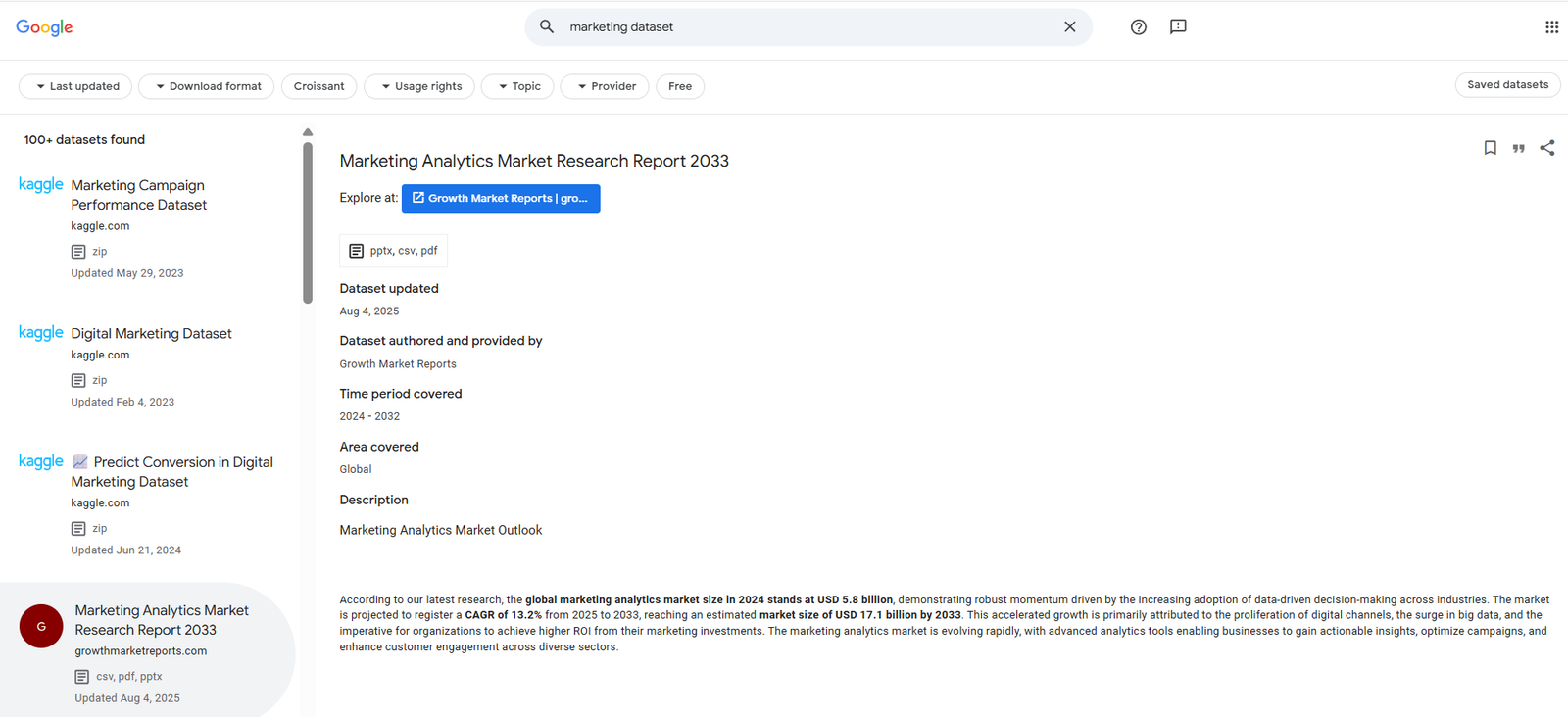
This structured data can appear in:
- Google Dataset Search
- Research-based search results
- Data discovery platforms
It helps improve visibility for data-driven content.
When Should You Use It?
Use this markup when:
- You publish datasets or structured data
- Users can download or access the data
- The page is focused on a dataset
- Data is clearly structured and described
Common examples include:
- Research datasets
- Government data portals
- Analytics reports
- Downloadable CSV or Excel files
When Should You Avoid Using It?
Avoid using this markup when:
- The page does not contain a dataset
- Content is purely informational
- There is no downloadable or structured data
- The data is incomplete
Structured data must always reflect actual content.
How It Works
This schema connects different components:
- Dataset defines the main data
- DataCatalog groups datasets
- DataDownload provides access to files
This structure helps search engines understand both the dataset and how it is distributed.
Core Elements of the Markup
A complete Dataset structured data implementation includes:
- @type – Defines the entity as Dataset
- @id – Unique identifier for the dataset
- name – Title of the dataset
- description – Explains what the dataset contains
- url – Link to the dataset page
- datePublished – Indicates when the dataset was released
- creator – Defines who created the dataset
- includedInDataCatalog – Links the dataset to a catalog
- distribution – Defines how the dataset can be accessed
Advanced Properties for Better Results
To improve discoverability and clarity, include:
- license – Defines how the dataset can be used or shared
- encodingFormat – Specifies file format (CSV, Excel, JSON)
- contentUrl – Direct link to the dataset file
- keywords – Helps with contextual relevance
- creator.url – Strengthens entity association
Implementation Example Using JSON-LD
<script type="application/ld+json">
{
"@context": "https://schema.org",
"@type": "Dataset",
"@id": "https://example.com/dataset/marketing-data#dataset",
"name": "Digital Marketing Performance Dataset",
"description": "A dataset containing SEO, PPC, and social media performance metrics for analysis.",
"url": "https://example.com/dataset/marketing-data",
"datePublished": "2025-01-10",
"license": "https://creativecommons.org/licenses/by/4.0/",
"keywords": ["SEO data", "PPC data", "social media analytics"],
"creator": {
 "@type": "Organization",
 "name": "ABC Analytics",
 "url": "https://example.com"
},
"includedInDataCatalog": {
 "@type": "DataCatalog",
 "name": "Marketing Data Repository",
 "url": "https://example.com/data-catalog"
},
"distribution": {
 "@type": "DataDownload",
 "encodingFormat": "text/csv",
 "contentUrl": "https://example.com/dataset/marketing-data.csv"
}
}
</script>
Implementation Example Using Microdata
<div itemscope itemtype="https://schema.org/Dataset">
<meta itemprop="url" content="https://example.com/dataset/marketing-data">
<span itemprop="name">Digital Marketing Performance Dataset</span>
<span itemprop="description">
A dataset containing SEO, PPC, and social media performance metrics for analysis.
</span>
<meta itemprop="datePublished" content="2025-01-10">
<link itemprop="license" href="https://creativecommons.org/licenses/by/4.0/">
<div itemprop="creator" itemscope itemtype="https://schema.org/Organization">
 <span itemprop="name">ABC Analytics</span>
 <link itemprop="url" href="https://example.com">
</div>
<div itemprop="includedInDataCatalog" itemscope itemtype="https://schema.org/DataCatalog">
 <span itemprop="name">Marketing Data Repository</span>
 <link itemprop="url" href="https://example.com/data-catalog">
</div>
<div itemprop="distribution" itemscope itemtype="https://schema.org/DataDownload">
 <link itemprop="contentUrl" href="https://example.com/dataset/marketing-data.csv">
 <meta itemprop="encodingFormat" content="text/csv">
</div>
</div>
Visibility and Content Requirements
Before implementing this markup:
- The dataset must be clearly described
- Download links must be functional
- License information must be accurate
- Creator details must match visible content
Structured data must always reflect the actual page content.
Placement of the Code
You can place JSON-LD:
- Inside the <head> section
- Or before the closing </body> tag
If using WordPress:
- Use custom code plugins
- Add via theme header
- Use SEO plugins
Validating the Structured Data
After implementation:
- Use Schema Markup Validator
- Check visibility in Dataset Search
- Fix all errors and warnings
Common Implementation Mistakes
Avoid these issues:
- Missing license property
- Invalid or broken dataset URLs
- Missing distribution details
- Incorrect file format
- Structured data not matching visible content
Conclusion
Dataset structured data helps search engines understand structured data resources and how users can access them.
Including important properties like license, distribution, and creator details improves discoverability and ensures your dataset is properly interpreted.
When implemented correctly, it becomes an important part of technical SEO for data-driven websites.
By Rohith Sasanken