


 Facebook
 Twitter
 Instagram
 YouTube
How to Create and Implement Merchant Listing Structured Data on a Website



If your website sells products and you want search engines to clearly understand details such as price, availability, shipping, and return policies, you need to implement Merchant Listing structured data correctly.
When configured properly, this schema helps search engines display product details directly in search results, improving visibility and increasing click-through rates.
What is Merchant Listing Structured Data?
Merchant Listing structured data is used to describe a product along with its purchasing details.
It is typically implemented using:
- Product
- Offer
This markup helps search engines understand:
- Product information
- Pricing
- Availability
- Shipping details
- Return policy
- Customer ratings and reviews
This makes your product eligible for enhanced search results.
Where This Schema Appears in Search
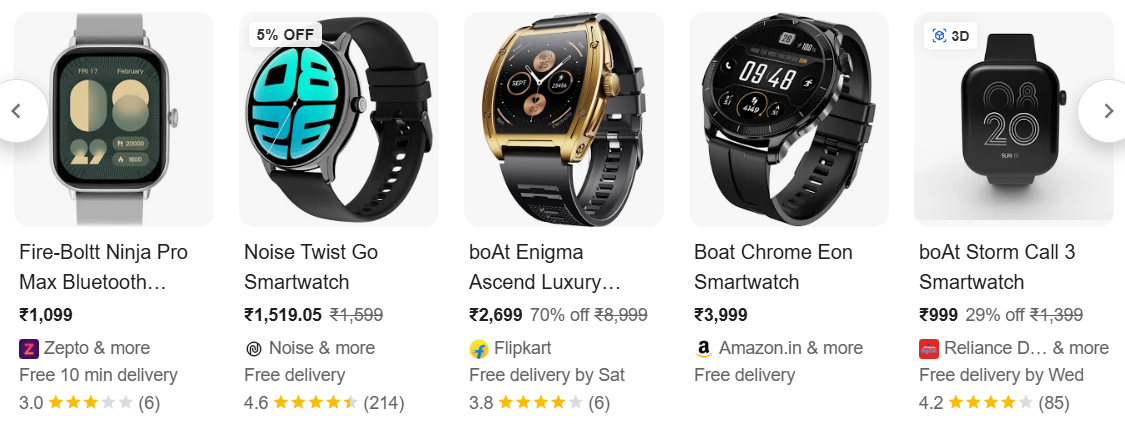
This structured data can appear in:
- Product rich results
- Google Shopping listings
- Search results with price and ratings
- Product knowledge panels
This is one of the most important schemas for eCommerce websites.
The exact appearance may vary depending on the query, product type, and Google’s display format.
When Should You Use It?
Use this markup when:
- You are selling a product
- The page represents a single product
- Pricing is clearly visible
- Users can purchase the product
Common examples include:
- eCommerce product pages
- Digital product listings
- Service packages with pricing
When Should You Avoid Using It?
Avoid using this markup when:
- The page is not a product page
- Pricing is missing
- Product is not available for purchase
- Structured data does not match page content
How It Works
This schema defines both the product and how it can be purchased.
- Product describes the item
- Offer describes pricing and availability
- Additional properties improve trust and completeness
Adding details like shipping, return policy, and reviews strengthens how search engines interpret your product.
Core Elements of the Markup
@type
Defines the entity type as Product
name
Represents the product name
image
Provides product images
description
Describes the product
sku
Unique product identifier
brand
Defines the brand
offers
Contains purchase-related details
Advanced Properties for Better Results
shippingDetails
Defines delivery cost, region, and time
hasMerchantReturnPolicy
Specifies return conditions and duration
aggregateRating
Shows overall rating of the product
review
Includes user feedback
These properties improve eligibility for richer search results.
Implementation Example Using JSON-LD
<script type="application/ld+json">
{
"@context": "https://schema.org",
"@type": "Product",
"@id": "https://example.com/product/smartwatch#product",
"name": "Smart Fitness Watch X200",
"image": [
  "https://example.com/images/smartwatch-front.jpg",
  "https://example.com/images/smartwatch-side.jpg"
],
"description": "Smart fitness watch with heart rate monitoring, sleep tracking, and 7-day battery life.",
"sku": "SWX200-BLK",
"brand": {
  "@type": "Brand",
  "name": "FitTech"
},
"url": "https://example.com/product/smartwatch",
"offers": {
  "@type": "Offer",
  "url": "https://example.com/product/smartwatch",
  "price": "2999",
  "priceCurrency": "INR",
  "availability": "https://schema.org/InStock",
  "itemCondition": "https://schema.org/NewCondition",
  "shippingDetails": {
    "@type": "OfferShippingDetails",
    "shippingRate": {
      "@type": "MonetaryAmount",
      "value": "50",
      "currency": "INR"
    },
    "shippingDestination": {
      "@type": "DefinedRegion",
      "addressCountry": "IN"
    },
    "deliveryTime": {
      "@type": "ShippingDeliveryTime",
      "handlingTime": {
        "@type": "QuantitativeValue",
        "minValue": 0,
        "maxValue": 1,
        "unitCode": "d"
      },
      "transitTime": {
        "@type": "QuantitativeValue",
        "minValue": 2,
        "maxValue": 5,
        "unitCode": "d"
      }
    }
  },
  "hasMerchantReturnPolicy": {
    "@type": "MerchantReturnPolicy",
    "applicableCountry": "IN",
    "returnPolicyCategory": "https://schema.org/MerchantReturnFiniteReturnWindow",
    "merchantReturnDays": 10,
    "returnMethod": "https://schema.org/ReturnByMail",
    "returnFees": "https://schema.org/FreeReturn"
  }
},
"aggregateRating": {
  "@type": "AggregateRating",
  "ratingValue": "4.6",
  "reviewCount": "87"
},
"review": [
  {
    "@type": "Review",
    "author": {
      "@type": "Person",
      "name": "Amit Verma"
    },
    "reviewRating": {
      "@type": "Rating",
      "ratingValue": "5"
    },
    "reviewBody": "Great battery life and accurate fitness tracking. Worth the price."
  }
]
}
</script>
Implementation Example Using Microdata
<div itemscope itemtype="https://schema.org/Product">
 <span itemprop="name">Smart Fitness Watch X200</span>
 <img decoding="async" itemprop="image" src="https://example.com/images/smartwatch-front.jpg" alt="Smart Fitness Watch">
 <img decoding="async" itemprop="image" src="https://example.com/images/smartwatch-side.jpg" alt="Smart Fitness Watch Side View">
 <span itemprop="description">
   Smart fitness watch with heart rate monitoring, sleep tracking, and 7-day battery life.
 </span>
 <span itemprop="sku">SWX200-BLK</span>
<div itemprop="brand" itemscope itemtype="https://schema.org/Brand">
   <span itemprop="name">FitTech</span>
 </div>
<link itemprop="url" href="https://example.com/product/smartwatch">
<div itemprop="offers" itemscope itemtype="https://schema.org/Offer">
<link itemprop="url" href="https://example.com/product/smartwatch">
   <meta itemprop="price" content="2999">
   <meta itemprop="priceCurrency" content="INR">
   <link itemprop="availability" href="https://schema.org/InStock">
   <link itemprop="itemCondition" href="https://schema.org/NewCondition">
<div itemprop="shippingDetails" itemscope itemtype="https://schema.org/OfferShippingDetails">
<div itemprop="shippingRate" itemscope itemtype="https://schema.org/MonetaryAmount">
       <meta itemprop="value" content="50">
       <meta itemprop="currency" content="INR">
     </div>
<div itemprop="shippingDestination" itemscope itemtype="https://schema.org/DefinedRegion">
       <meta itemprop="addressCountry" content="IN">
     </div>
<div itemprop="deliveryTime" itemscope itemtype="https://schema.org/ShippingDeliveryTime">
<div itemprop="handlingTime" itemscope itemtype="https://schema.org/QuantitativeValue">
         <meta itemprop="minValue" content="0">
         <meta itemprop="maxValue" content="1">
         <meta itemprop="unitCode" content="d">
       </div>
<div itemprop="transitTime" itemscope itemtype="https://schema.org/QuantitativeValue">
         <meta itemprop="minValue" content="2">
         <meta itemprop="maxValue" content="5">
         <meta itemprop="unitCode" content="d">
       </div>
</div>
</div>
<div itemprop="hasMerchantReturnPolicy" itemscope itemtype="https://schema.org/MerchantReturnPolicy">
     <meta itemprop="applicableCountry" content="IN">
     <link itemprop="returnPolicyCategory" href="https://schema.org/MerchantReturnFiniteReturnWindow">
     <meta itemprop="merchantReturnDays" content="10">
     <link itemprop="returnMethod" href="https://schema.org/ReturnByMail">
     <link itemprop="returnFees" href="https://schema.org/FreeReturn">
   </div>
</div>
<div itemprop="aggregateRating" itemscope itemtype="https://schema.org/AggregateRating">
   <meta itemprop="ratingValue" content="4.6">
   <meta itemprop="reviewCount" content="87">
 </div>
<div itemprop="review" itemscope itemtype="https://schema.org/Review">
<div itemprop="author" itemscope itemtype="https://schema.org/Person">
     <span itemprop="name">Amit Verma</span>
   </div>
<div itemprop="reviewRating" itemscope itemtype="https://schema.org/Rating">
     <meta itemprop="ratingValue" content="5">
   </div>
   <span itemprop="reviewBody">
     Great battery life and accurate fitness tracking. Worth the price.
   </span></div>
</div>
Visibility and Content Requirements
Before implementing:
- Product must be visible on the page
- Price must match exactly
- Reviews must be real
- Shipping and return policy must be accurate
Structured data must match visible content.
Placement of the Code
You can place JSON-LD:
- Inside the head section
- Or before closing body tag
For WordPress:
- Use custom code plugins
- Add in theme header
- Use SEO plugins
Validating the Structured Data
After implementation:
- Use Google Rich Results Test
- Use Schema Markup Validator
- Fix errors and warnings
Common Implementation Mistakes
- Missing price or currency
- Incorrect availability
- Missing shipping or return policy
- Fake reviews
- Mismatch between content and schema
Conclusion
Merchant Listing structured data helps search engines understand product details such as price, availability, shipping, and customer feedback.
When implemented with complete and accurate information, it improves visibility in search results and increases the chances of rich product listings.
By Rohith Sasanken