


 Facebook
 Twitter
 Instagram
 YouTube
How to Create and Implement Job Posting Schema on a Website



If your website publishes job openings and you want search engines to clearly understand the job details, you need to implement Job Posting structured data correctly.
When configured properly, this schema helps search engines understand key job information such as role, location, salary, and application details, improving how your job listings appear in search results.
Also Read: What Types of Schema Markup Can Be Implemented?
What is Job Posting Schema?
Job Posting schema is structured data used to describe job opportunities on a website.
It provides search engines with important details such as:
- Job title
- Job description
- Hiring organization
- Job location
- Salary details
- Employment type
- Application deadline
Instead of relying on search engines to interpret this information from plain content, structured data presents it in a clear and structured format.
Where This Schema Appears in Search
Job posting structured data can appear in:
- Google job search results
- Enhanced job listings
- Job-related search queries
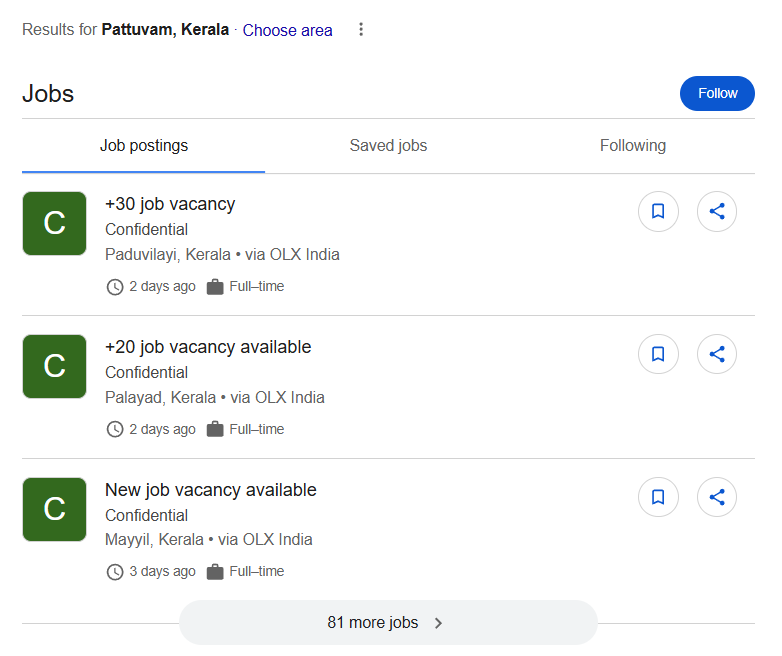
When implemented correctly, your job listings may appear in Google’s dedicated job search interface.
Why Job Posting Structured Data is Important
When implemented correctly, this markup helps:
- Improve visibility in job-related searches
- Increase click-through rate
- Display job details directly in search
- Make listings eligible for Google Jobs
- Improve candidate reach
For websites that regularly publish job openings, this is highly valuable.
When Should You Use It?
Use this markup when:
- You are publishing real job openings
- The job is currently active
- The page includes full job details
- Users can apply for the job
It is typically used on:
- Job listing pages
- Career pages
- Recruitment portals
When Should You Avoid Using It?
Avoid using this markup when:
- The job is no longer active
- The page is only informational
- The job details are incomplete
- The job cannot be applied for
Structured data must always reflect real and active listings.
How It Works
When search engines crawl your page:
- They read the job structured data
- They identify job title, company, and location
- They analyze salary and employment details
- They determine eligibility for job search features
Core Elements of the Markup
A properly structured job posting includes several important properties.
@type
Defines the entity type as JobPosting
title
The name of the job role
description
Detailed explanation of job responsibilities and requirements
hiringOrganization
Defines the company offering the job
jobLocation
Specifies where the job is located
employmentType
Defines full-time, part-time, contract, etc.
datePosted
Indicates when the job was published
validThrough
Defines the application deadline
baseSalary
Provides salary details (if available)
Implementation Example Using JSON-LD
<script type="application/ld+json">
{
 "@context": "https://schema.org",
 "@type": "JobPosting",
 "title": "Digital Marketing Executive",
 "description": "We are looking for a Digital Marketing Executive with experience in SEO, PPC, and social media marketing.",
 "datePosted": "2026-03-20",
 "validThrough": "2026-04-20",
 "employmentType": "FULL_TIME",
 "hiringOrganization": {
   "@type": "Organization",
   "name": "ABC Marketing Agency",
   "sameAs": "https://example.com",
   "logo": "https://example.com/logo.png"
 },
 "jobLocation": {
   "@type": "Place",
   "address": {
     "@type": "PostalAddress",
     "streetAddress": "Business Street",
     "addressLocality": "Bengaluru",
     "addressRegion": "Karnataka",
     "postalCode": "560001",
     "addressCountry": "IN"
   }
 },
 "baseSalary": {
   "@type": "MonetaryAmount",
   "currency": "INR",
   "value": {
     "@type": "QuantitativeValue",
     "value": 30000,
     "unitText": "MONTH"
   }
 }
}
</script>
Implementation Example Using Microdata
<div itemscope itemtype="https://schema.org/JobPosting">
  <span itemprop="title">Digital Marketing Executive</span>
  <span itemprop="description">
    We are looking for a Digital Marketing Executive with experience in SEO and PPC.
  </span>
  <meta itemprop="datePosted" content="2026-03-20">
  <meta itemprop="validThrough" content="2026-04-20">
  <span itemprop="employmentType">FULL_TIME</span>
  <!-- Hiring Organization -->
<div itemprop="hiringOrganization" itemscope itemtype="https://schema.org/Organization">
    <span itemprop="name">ABC Marketing Agency</span>
  </div>
  <!-- Job Location -->
<div itemprop="jobLocation" itemscope itemtype="https://schema.org/Place">
<div itemprop="address" itemscope itemtype="https://schema.org/PostalAddress">
      <span itemprop="streetAddress">Business Street</span>,
      <span itemprop="addressLocality">Bengaluru</span>,
      <span itemprop="addressRegion">Karnataka</span>,
      <span itemprop="postalCode">560001</span>,
      <span itemprop="addressCountry">IN</span>
    </div>
</div>
  <!-- Salary -->
<div itemprop="baseSalary" itemscope itemtype="https://schema.org/MonetaryAmount">
    <meta itemprop="currency" content="INR">
<div itemprop="value" itemscope itemtype="https://schema.org/QuantitativeValue">
      <meta itemprop="value" content="30000">
      <meta itemprop="unitText" content="MONTH">
    </div>
</div>
</div>
Validating the Structured Data
After implementation:
- Use Google Rich Results Test
- Use Schema Markup Validator
- Fix any errors or warnings
Common Implementation Mistakes
- Missing job description
- Expired job listings not updated
- Incorrect salary format
- Missing required fields
- Structured data not matching visible content
Conclusion
Job Posting structured data helps search engines clearly understand job listings and display them in job-related search results.
When implemented correctly, it improves visibility, increases reach, and enhances how job opportunities appear in search.
For websites that regularly publish job openings, it becomes an important part of technical SEO.
Build your brand authority: Organisation Schema | Course List Schema (if you’re an educational institution)
By Rohith Sasanken