

 Facebook
 Twitter
 Instagram
 YouTube
How to Create and Implement Event Schema on a Website



If you are hosting events such as workshops, webinars, seminars, or conferences and want search engines to clearly understand the details, you need to implement Event structured data correctly.
When configured properly, this schema helps search engines understand key event information such as date, time, location, images, and ticket details, improving how your event appears in search results.
Also Read: What Types of Schema Markup Can Be Implemented?
What is Event Schema?
Event schema is structured data used to describe a specific event on your website.
It provides search engines with important details such as:
- Event name
- Description
- Date and time
- Location
- Organizer
- Performer or speaker
- Ticket details
- Event images
Instead of relying on search engines to interpret this information from plain text, structured data presents it in a clear and structured format.
Why Structured Data for Events is Important
When implemented correctly, this markup helps:
- Improve visibility in event-related searches
- Increase click-through rate
- Display event details directly in search results
- Enable rich results with images and event information
- Improve overall event discoverability
For websites that regularly host events, this becomes an important part of SEO.
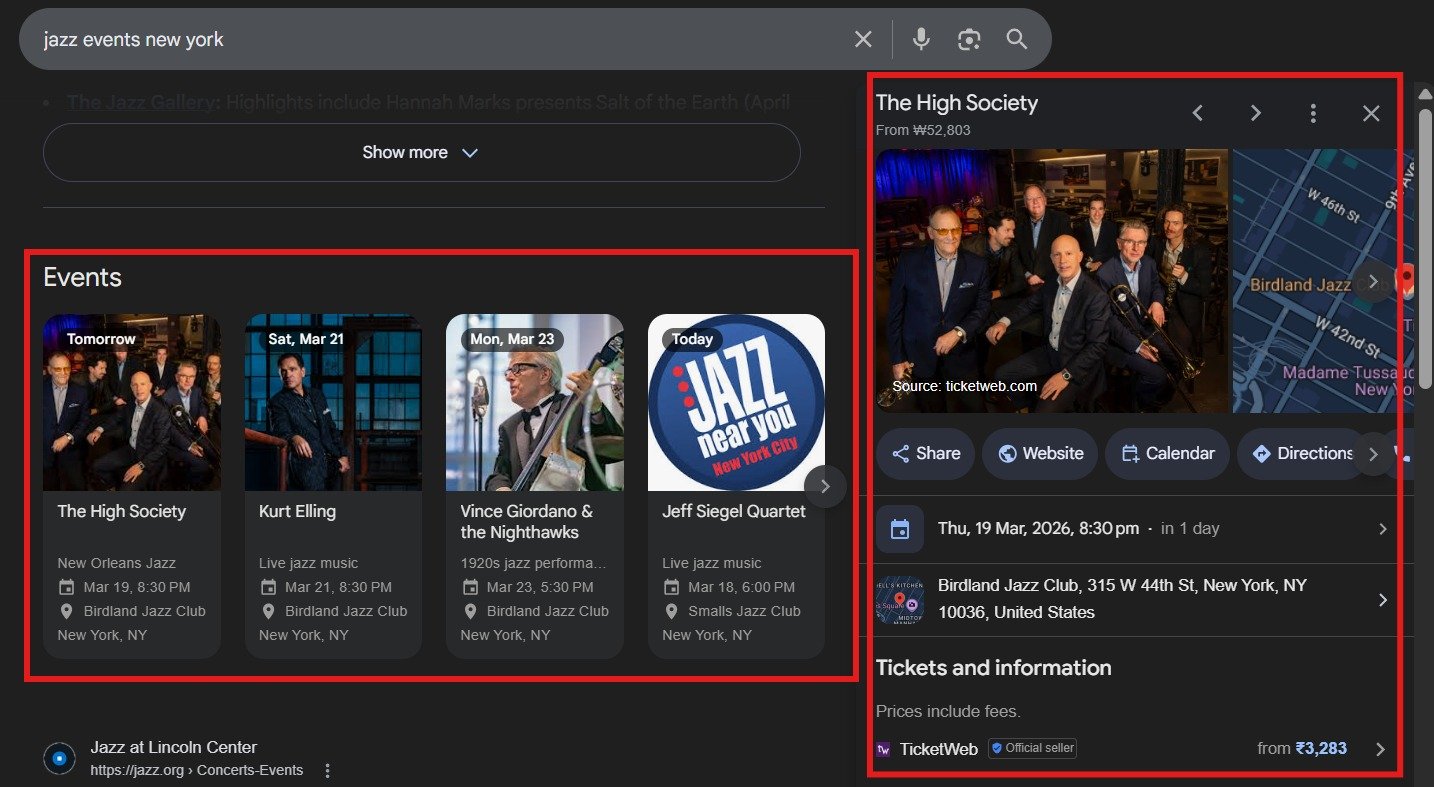
Where This Schema Appears in Search
Structured event data can appear in:
- Event-related search results
- Rich results with event details
- Google event listings
- Enhanced search displays with images and dates
When Should You Use It?
Use this markup when:
- You are hosting a real event
- The event has a fixed date and time
- The event is publicly accessible
- The page includes complete event details
It is typically added to:
- Event landing pages
- Registration pages
- Workshop or seminar pages
Each event should have its own structured data.
When Should You Avoid Using It?
Avoid using this markup when:
- The event does not exist
- The event has already ended and is not updated
- The page is only informational
- The details are incomplete or inaccurate
Structured data must always match the visible content.
How It Works
When search engines crawl your page:
- They read the structured event data
- They identify key details such as name, date, and location
- They analyze ticket availability and images
- They determine eligibility for enhanced search results
Core Elements of the Markup
A properly structured event markup includes several important properties that help search engines clearly understand the event details.
@type
Specifies the type of entity being described. For event pages, this is set to Event.
name
Represents the official title of the event and should match what is shown on the page.
description
Provides a short summary of the event, explaining what it is about.
startDate and endDate
Defines when the event begins and ends. These should follow ISO format and include timezone for accuracy.
eventStatus
Indicates whether the event is scheduled, cancelled, or rescheduled.
location
Specifies where the event takes place, including venue name and address.
image
Includes one or more images related to the event. This helps improve eligibility for rich results.
offers
Contains ticket-related details such as pricing, availability, and booking link.
performer
Identifies the speaker, artist, or participant involved in the event.
organizer
Defines the organization responsible for hosting the event.
Handling Event Status Updates
In some cases, the status of an event may change after it is published. Structured data allows you to update this information using the eventStatus property.
Common scenarios include:
- Cancelled event
- Rescheduled event
If an event is cancelled, the status can be updated like this:
eventStatus”: “https://schema.org/EventCancelledIf an event is rescheduled, you can update the status and also include the previous date:
eventStatus”: “https://schema.org/EventRescheduled
previousStartDate”: “2025-03-21T19:00-05:00
Updating event status ensures that search engines display accurate information and helps prevent outdated or incorrect event listings in search results.
Implementation Example Using JSON-LD
JSON-LD is the recommended format because it keeps structured data separate from page content and is easier to maintain.
<script type="application/ld+json">
{
"@context": "https://schema.org",
"@type": "Event",
"name": "Advanced Digital Marketing Workshop",
"description": "A hands-on workshop covering SEO, Google Ads, and performance marketing strategies.",
"startDate": "2026-06-10T10:00+05:30",
"endDate": "2026-06-10T16:00+05:30",
"eventStatus": "https://schema.org/EventScheduled",
"eventAttendanceMode": "https://schema.org/OfflineEventAttendanceMode",
"location": {
  "@type": "Place",
  "name": "Codestratz Training Center",
  "address": {
    "@type": "PostalAddress",
    "streetAddress": "Business Street",
    "addressLocality": "Bengaluru",
    "addressRegion": "Karnataka",
    "postalCode": "560001",
    "addressCountry": "IN"
  }
},
"image": [
  "https://example.com/images/event-1.jpg",
  "https://example.com/images/event-2.jpg"
],
"offers": {
  "@type": "Offer",
  "url": "https://example.com/register",
  "price": "2999",
  "priceCurrency": "INR",
  "availability": "https://schema.org/InStock",
  "validFrom": "2026-04-01T09:00"
},
"performer": {
  "@type": "Person",
  "name": "John Doe"
},
"organizer": {
  "@type": "Organization",
  "name": "Codestratz Advertising Pvt Ltd",
  "url": "https://codestratz.com"
}
}
</script>
Replace the example values with your actual event details before implementation.
Implementation Example Using Microdata
<div itemscope itemtype="https://schema.org/Event">
 <span itemprop="name">Advanced Digital Marketing Workshop</span>
 <span itemprop="description">
   A hands-on workshop covering SEO, Google Ads, and performance marketing strategies.
 </span>
 <meta itemprop="startDate" content="2026-06-10T10:00+05:30">
 <meta itemprop="endDate" content="2026-06-10T16:00+05:30">
<link itemprop="eventStatus" href="https://schema.org/EventScheduled">
 <link itemprop="eventAttendanceMode" href="https://schema.org/OfflineEventAttendanceMode">
<div itemprop="location" itemscope itemtype="https://schema.org/Place">
   <span itemprop="name">Codestratz Training Center</span>
<div itemprop="address" itemscope itemtype="https://schema.org/PostalAddress">
     <span itemprop="streetAddress">Business Street</span>,
     <span itemprop="addressLocality">Bengaluru</span>,
     <span itemprop="addressRegion">Karnataka</span>,
     <span itemprop="postalCode">560001</span>,
     <span itemprop="addressCountry">IN</span>
   </div>
</div>
 <img decoding="async" itemprop="image" src="https://example.com/images/event-1.jpg" alt="Event Image">
 <img decoding="async" itemprop="image" src="https://example.com/images/event-2.jpg" alt="Event Image">
<div itemprop="offers" itemscope itemtype="https://schema.org/Offer">
   <link itemprop="url" href="https://example.com/register">
   <meta itemprop="price" content="2999">
   <meta itemprop="priceCurrency" content="INR">
   <link itemprop="availability" href="https://schema.org/InStock">
   <meta itemprop="validFrom" content="2026-04-01T09:00">
 </div>
<div itemprop="performer" itemscope itemtype="https://schema.org/Person">
   <span itemprop="name">John Doe</span>
 </div>
<div itemprop="organizer" itemscope itemtype="https://schema.org/Organization">
   <span itemprop="name">Codestratz Advertising Pvt Ltd</span>
   <link itemprop="url" href="https://codestratz.com">
 </div>
</div>
Validating the Structured Data
After implementation:
- Use Google Rich Results Test
- Use Schema Markup Validator
- Fix any errors or warnings
Common Implementation Mistakes
- Missing timezone in date values
- Incorrect or outdated event details
- Missing image property
- Inconsistent ticket information
- Structured data not matching visible content
Conclusion
Event structured data helps search engines clearly understand important details such as date, time, location, images, and ticket information.
When implemented correctly, it improves visibility in search results and increases the chances of getting enhanced event listings.
For websites that regularly host events, it becomes an important part of technical SEO.
Related: Local Business Schema | Course List Schema (if you’re promoting workshops or courses)
By Rohith Sasanken