


 Facebook
 Twitter
 Instagram
 YouTube
How to Create and Implement Review Schema on a Website



Review schema helps search engines understand user feedback, ratings, and opinions about a specific item on your website. When implemented correctly, Google may display star ratings, review counts, and rating summaries directly in search results, making your listing more noticeable and trustworthy.
This guide explains what Review schema is, when it should be used, how it works, what properties are required, and how to implement it properly using JSON-LD and HTML-based markup, with clean, schema-valid examples you can apply directly.
Also Read: What Types of Schema Markup Can Be Implemented?
What Is Review Schema?
Review schema is structured data that describes a user’s evaluation of a specific item.
It tells search engines:
- What item is being reviewed
- Who wrote the review
- What rating was given
- How many users contributed (if aggregated)
Review schema is based on Schema.org types such as:
- Review
- AggregateRating
- Rating
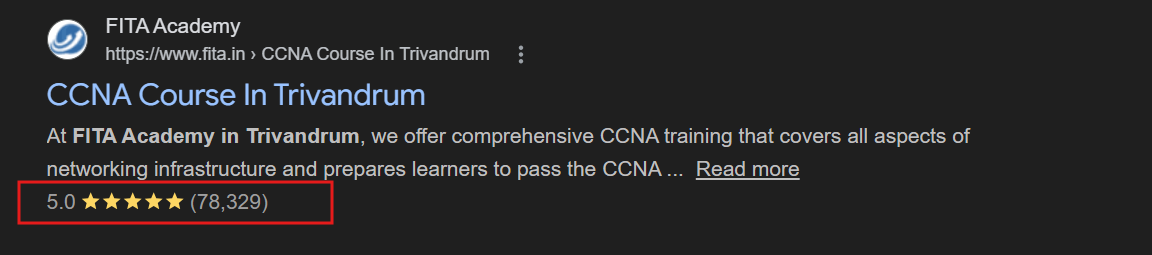
When Google finds valid and eligible review markup, it may display star ratings in search results. These are commonly known as Review Snippets.
Where Review Snippets Appear in Google Search
Review snippets can appear:
- On desktop and mobile search results
- Across most regions where Google supports rich results
- On product, course, recipe, and software listings
Instead of showing just a plain search result, Google may display:
- Star ratings
- Average score
- Number of reviews
This enhances visibility and improves click confidence.
When Should You Use Review Schema?
Review schema should only be used when a page contains genuine, visible reviews about a specific item.
Common use cases include:
- Product detail pages
- Online courses
- Software applications
- Books
- Recipes
- Events
Review schema should not be used for:
- Category pages
- Homepages
- “Top 10” blog lists
- General company reputation statements
Understanding Review vs AggregateRating
Before implementation, it is important to understand the difference between these two types.
A Review represents a single person’s opinion. It includes the reviewer’s name, rating value, and optionally written feedback.
An AggregateRating represents the average rating calculated from multiple users. It includes the overall score and total number of ratings or reviews.
Most websites use AggregateRating because it displays the combined rating summary in search results. However, individual Review markup can also be included alongside it.
How Review Schema Works
Review schema can be implemented in two ways:
- As a standalone Review or AggregateRating
- Nested inside another schema type such as Product or Course
When nested, the parent type defines the item being reviewed. This is the most common and recommended approach.
Google processes this structured data to determine whether your page qualifies for review snippet enhancements.
Core Components of Review Schema
The Review type describes a single review written by a person or organization.
For Review to be valid and eligible, the following properties must be included:
ItemReviewed
The itemReviewed property must define what is being reviewed. Without it, search engines cannot associate the review with an item.
Author
The author property must identify who wrote the review. It can be a Person or Organization.
ReviewRating
The reviewRating property must define the rating given. Inside reviewRating, ratingValue is required.
If reviewRating is missing, the review is incomplete and invalid for rich results.
Although not mandatory, bestRating and worstRating are strongly recommended to clearly define the rating scale.
Here is a clean, valid JSON-LD example of a single review:
<script type="application/ld+json">
{
  "@context": "https://schema.org/",
  "@type": "Product",
  "name": "Technical SEO Toolkit",
  "description": "A comprehensive toolkit designed to simplify SEO audits and improve workflow efficiency.",
  "brand": {
    "@type": "Brand",
    "name": "Your Brand Name"
  },
  "review": {
    "@type": "Review",
    "author": {
      "@type": "Person",
      "name": "Arjun Nair"
    },
    "datePublished": "2026-01-20",
    "reviewBody": "The toolkit simplified our SEO audits and improved workflow efficiency.",
    "reviewRating": {
      "@type": "Rating",
      "ratingValue": 4,
      "bestRating": 5,
      "worstRating": 1
    }
  }
}
</script>
Core Components of Aggregate Rating
Aggregate Rating represents the combined average rating from multiple users.
For AggregateRating to be valid, the following are required:
- ratingValue must be present.
- At least one of these must also be present:
ReviewCount or RatingCount. - If AggregateRating is used on its own, itemReviewed must define the item.
If it is nested inside another schema type like Product, itemReviewed is not required because the parent already defines it.
Example of standalone AggregateRating:
<script type="application/ld+json">
{
  "@context": "https://schema.org/",
  "@type": "AggregateRating",
  "itemReviewed": {
    "@type": "Course",
    "name": "Advanced Digital Marketing Certification",
    "description": "A professional certification program covering SEO, paid advertising, analytics, and marketing strategy."
  },
  "ratingValue": 4.6,
  "reviewCount": 132,
  "bestRating": 5,
  "worstRating": 1
}
</script>
Example of nested AggregateRating inside Product:
<script type="application/ld+json">
{
  "@context": "https://schema.org/",
  "@type": "Product",
  "name": "Enterprise Analytics Dashboard",
  "description": "An enterprise-level analytics platform for tracking business performance.",
  "brand": {
    "@type": "Brand",
    "name": "DataPro Systems"
  },
  "aggregateRating": {
    "@type": "AggregateRating",
    "ratingValue": 4.7,
    "reviewCount": 89,
    "bestRating": 5,
    "worstRating": 1
  }
}
</script>
Creating Review Schema Using JSON-LD
JSON-LD is Google’s preferred format because it keeps structured data separate from the page design and is easier to maintain.
It can be placed inside the <head> section or before the closing </body> tag.
JSON-LD does not interfere with HTML layout and is easier to update programmatically.
Creating Review Schema Using HTML Microdata
Review schema can also be implemented using Microdata, where structured data attributes are embedded directly into HTML elements.
This method works but is harder to maintain compared to JSON-LD.
Example:
<div itemscope itemtype="https://schema.org/Product">
<h2 itemprop="name">Marketing Automation Platform</h2>
<div itemprop="aggregateRating"
      itemscope
      itemtype="https://schema.org/AggregateRating">
   <span itemprop="ratingValue">4.5</span> out of 5
   based on
   <span itemprop="reviewCount">74</span> reviews
 </div>
</div>
Important Google Guidelines for Review Schema
- Reviews must be visible to users. If users cannot see the review content on the page, you should not mark it up.
- Self-serving reviews are not eligible. Businesses cannot add review markup about themselves on their own LocalBusiness or Organization homepage and expect star ratings to appear.
- You must not aggregate ratings from external websites. Only include ratings collected directly from your platform.
- The rating must reflect genuine user feedback. Artificial or editorial ratings violate guidelines.
- Review schema must refer to a specific item, not a general category.
Multiple Reviews on One Page
If a page contains multiple individual reviews, you can include multiple Review objects inside the parent Product or Course schema.
You may also include both individual reviews and an aggregateRating summary.
Google may choose to display the aggregate rating instead of individual reviews in search results.
Where to Place Review Schema Code
Review schema can be placed:
- Inside the <head> section
- Before the closing </body> tag
Both locations are valid as long as Googlebot can access the markup.
How to Validate Review Schema
After implementation:
- Use Google Rich Results Test to check eligibility.
- Use Google Search Console URL Inspection to confirm Google can read the structured data.
- Review the Enhancements section for Review Snippets.
Fix errors first. Warnings should be reviewed but do not automatically block eligibility.
Common Review Schema Mistakes
- Marking up hidden reviews.
- Missing required properties such as ratingValue or reviewCount.
- Using incorrect decimal formats such as 4,5 instead of 4.5.
- Mismatch between visible rating and structured data rating.
- Applying review markup to category pages.
- Incorrect nesting of Review and AggregateRating.
- These mistakes can prevent review snippets from appearing.
Conclusion
Review schema helps search engines understand user feedback and improves how pages appear in search results. When implemented correctly, it enhances credibility, improves visibility, and increases click-through rates.
By defining the correct properties, following Google’s eligibility rules, and validating the markup properly, Review schema becomes a powerful enhancement tool without altering user experience.
If you implement it carefully and accurately, it can significantly strengthen your search presence.
Often used together: FAQ Schema | Movie Carousel Schema (for entertainment/product review sites)
By Rohith Sasanken